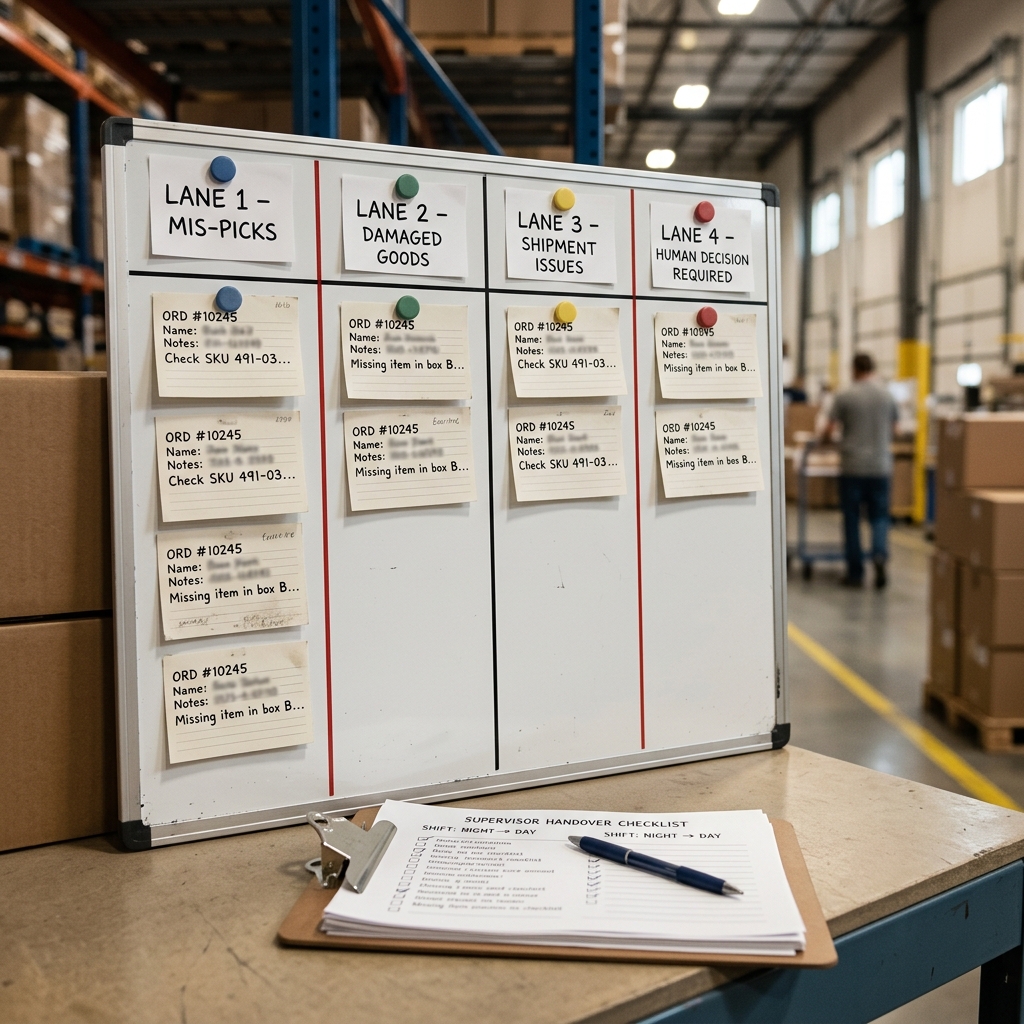
The shift is nearly over, but four exception notes still need to become a clear handover. One note has a quantity but no timestamp. Another describes damaged goods. A third suggests changing inventory. The last is a loose list of unfinished actions.
Before opening an AI tool, take 60 seconds to route each note. First, ask whether it involves an immediate danger or restricted information. Then decide whether the task is simply organizing verified text or whether someone must establish a fact, approve an action or update an official record.
AI may help format, group or summarize approved, minimized and non-sensitive text. It cannot establish what happened, authorize a response or turn a rough note into an official record. Facts, decisions, approvals and recordkeeping remain with designated people using company processes.
Quick answer: Place each exception note into one of four lanes: safe to structure, needs a missing-fact check, needs supervisor or specialist approval, or do not process in AI. Use only an employer-approved AI tool and use case. Treat every output as an unverified draft, compare it with the original sources and stop before any record, adjustment, commitment or external message is created.
If you want additional supervised drafting, organization and review support, explore the Advanced AI Toolkit for Warehouse Supervisors in eCommerce Fulfillment Warehouses (USA). It is designed as a drafting aid for beginner US warehouse supervisors, not as a safety tool, operational decision system, system of record or substitute for site SOPs.
Affiliate disclosure: SBA Shortcut Shelf may earn a commission if you purchase through this link, at no extra cost to you. If it fits your employer's approved workflow, ClickUp can serve as an adjacent tool for assigning reviewed, non-sensitive follow-up actions, owners and due dates after site SOPs and approvals have been applied. It is not a WMS, ERP, system of record, safety system, HR process or operational control.
The 60-Second Check Before You Use AI
Use this minimum check when a handover is due and time is short:
- Check for immediate danger. An injury, equipment hazard, fire, chemical release, violence, threat or other immediate danger bypasses the AI workflow. Follow emergency procedures and the site's escalation process.
- Check the information. Do not enter personal, employee, customer, credential, image, sensitive incident or confidential operational information merely to make a note easier to read.
- Check the task. Ask whether you are only organizing verified text. If the task would change a record, make a commitment, interpret policy, select a response or approve an action, it needs authorized human handling.
- Choose a lane. Route the note to structure, fact check, approval or no-AI handling.
AI use is optional. It must be limited to company-approved tools, configurations and use cases. Privacy, security, access and retention rules still apply even when a note looks routine.
The NIST Generative AI Profile, published July 26, 2024, supports human oversight and checking generated information against known facts. That principle fits this workflow: an organized note remains a draft until a person compares it with approved sources. NIST does not certify a particular AI product or warehouse process.
The Warehouse Exception Note Triage Board
The four-lane board below is a routing aid. It helps separate a bounded drafting task from work that requires fact verification, approval, escalation or protected handling.
Use the narrowest suitable lane. A note that begins as safe to structure may move to another lane if the output reveals a missing quantity, proposed adjustment or sensitive detail.
Stop-and-escalate rule: Do not continue drafting when there is an immediate danger, restricted information, an unclear policy boundary or a request for AI to decide or authorize an action. Site SOPs and authorized roles control final handling.
Before any WMS or ERP entry, inventory adjustment, carrier commitment, customer-facing communication or official report, compare the draft with approved source records and obtain every required approval.
Four Fictional Notes and Where They Belong
Every example in this section is fictional, minimized and non-sensitive. The placeholders are intentional and do not represent real warehouse identifiers.
1. Damaged goods: safe to structure
Original minimized note: [ITEM] found damaged in [ZONE]. Verified affected quantity: [VERIFIED QUANTITY]. Approved containment step already taken: moved to [APPROVED HOLD LOCATION]. Next owner role: [ROLE].
- Lane: Safe to structure.
- Allowed AI task: Put the verified observations into headings for observation, quantity, containment and next owner role.
- Human check: Compare every field with the original note and approved source record.
- Prohibited next step: Do not let AI select a disposition, determine a cause, adjust inventory or create an incident record.
A bounded prompt could say: Organize the verified note into four headings. Do not add causes, decisions or recommendations. Preserve all placeholders. List unclear details under Missing facts.
2. Returns note: needs a missing-fact check
Original minimized note: Return group [BATCH PLACEHOLDER] is in [AREA]. Package condition is [VERIFIED CONDITION]. Disposition and receipt time are not verified.
- Lane: Needs a missing-fact check.
- Allowed AI task: Separate the verified facts from a list of details that remain unknown.
- Human check: Find the receipt time and disposition through approved systems or designated staff.
- Prohibited next step: Do not ask AI to infer the timestamp, select a disposition or recommend an inventory adjustment.
The draft stops until the missing facts are checked at their original sources. Rephrasing an unknown detail does not make it verified.
3. Inventory discrepancy: approval-controlled action
Original minimized note: Count for [ITEM] in [ZONE] differs from the displayed quantity. Physical recount status: [STATUS]. Source record reviewed: [SOURCE TO VERIFY].
- Lane: Needs supervisor or specialist approval.
- Allowed AI task: Organize the observation, recount status and open verification questions.
- Human check: Authorized staff must confirm the physical count, source records, local process and required approvals.
- Prohibited next step: The organized note cannot support or authorize an inventory adjustment by itself. AI must not change the WMS or ERP.
Organizing an observation is different from authorizing an action. Even a clear draft remains outside the official inventory workflow until verified and handled by the appropriate role.
4. Unresolved shift actions: draft a handover list
Original minimized note: [ACTION A]—status [VERIFIED STATUS]—owner [ROLE]. [ACTION B]—status needs source check—owner [ROLE].
- Lane: Action A may be safe to structure. Action B needs a missing-fact check.
- Allowed AI task: Create a draft table-like list with action, current status, owner role, verification source and approval needed.
- Human check: Verify every status and confirm that the listed role is the proper owner before assigning work.
- Prohibited next step: Do not use the draft to bypass approvals, change workflows or update official systems.
Mixed notes do not have to stay in one lane. Split the verified portion from the uncertain portion, then route each part correctly.
Use a Placeholder-First Drafting Method
A placeholder-first method reduces the amount of operational information placed in a drafting tool and makes gaps visible. It does not automatically make an AI use safe or compliant. The employer's approved configuration, AI policy, privacy and security requirements, vendor terms and retention settings still control.
- Name the drafting task. Ask for formatting, grouping or summarization rather than a decision.
- Specify the output format. Request headings, bullets or a handover checklist.
- Use neutral placeholders. Examples include [ZONE], [ITEM], [QUANTITY TO VERIFY], [TIME TO VERIFY] and [OWNER ROLE].
- Prohibit inference. Tell the tool not to fill gaps, choose a cause or recommend an action.
- Request missing facts separately. Unknown details should be listed rather than blended into the draft.
- Verify fact by fact. Compare the result with the original note and approved source systems.
Copyable placeholder-first input pattern: Fictional, non-sensitive drafting task: Organize the verified note below into [PERMITTED FORMAT]. Preserve [ITEM], [ZONE], [QUANTITY TO VERIFY], [TIME TO VERIFY] and [OWNER ROLE] exactly as written. Do not infer missing details, add causes, make decisions or recommend actions. Put every unclear or unsupported detail in a separate Missing facts list. Note: [INSERT APPROVED, MINIMIZED TEXT].
Do not include personal or protected employee information, customer details, access credentials, photos, video, sensitive incident details, proprietary exports or confidential operational information unless organizational policy expressly permits the specific tool, configuration and use case.
The NIST Privacy Framework, dated January 16, 2020, supports governance, authorized access and disclosure controls, granular data control and privacy-risk assessment. It does not establish that placeholders, de-identification or a particular AI configuration satisfies an employer's privacy obligations.
When to Stop Drafting and Escalate
Stop using the drafting workflow and follow the appropriate emergency procedure, site SOP or designated escalation route when a note involves:
- an injury or potential serious injury;
- an equipment hazard, fire, chemical release or other immediate danger;
- violence, a threat or an urgent security concern;
- employee discipline, performance assessment or another HR matter;
- official incident handling or investigation;
- unclear policy or a request to interpret policy;
- possible exposure of customer, employee or restricted operational data; or
- a request for final safety, inventory, carrier, customer-service or operational approval.
AI does not investigate incidents, make safety decisions, assess employees, recommend discipline or determine whether an event is OSHA-reportable. Official reports and investigations remain in approved company processes. Designated safety, HR, privacy, security and operational staff determine reporting, approvals and record entries.
Prompt escalation matters because some reporting duties can be time-sensitive. According to OSHA's Report a Fatality or Severe Injury page, employers under OSHA jurisdiction must report a work-related fatality within 8 hours and a work-related in-patient hospitalization, amputation or loss of an eye within 24 hours. OSHA-approved State Plan requirements can vary.
Those timelines are not a supervisor-facing test for reportability. Applicability and reportability are fact-specific and must be handled through the employer's designated safety process. Immediate dangers should always bypass AI and follow emergency and site procedures.
Move Only Reviewed Actions Into the Official Workflow
Once a note has been organized, keep it in the drafting workflow until it passes this controlled sequence:
- Compare the draft with source facts. Check each statement against the original note and approved systems.
- Correct or discard unsupported content. Do not preserve a polished sentence merely because it sounds plausible.
- Obtain required approval. Use designated supervisors or specialists for inventory, carrier, customer, safety, HR, privacy, security and policy-controlled actions.
- Complete official work through approved processes. Only authorized staff should make WMS or ERP entries, inventory adjustments, carrier commitments, customer-facing communications or official reports.
- Track reviewed follow-up actions. After SOPs and approvals have been applied, an employer-approved work-management tool may be used to assign non-sensitive actions, owner roles and due dates.
Verify before every WMS or ERP update. Verify and obtain approval before an inventory adjustment, carrier commitment or customer-facing communication. An AI draft is not authorization for any of these steps.
Final stop-check: Before an action leaves the drafting workflow, ask: Are the facts verified? Is the approver authorized? Is this the approved process? Is restricted information protected? If any answer is no or unclear, stop and route the item to the designated person.
Warehouse Exception Note Triage Board
Lane 1: Safe to structure
- Quick test: Are all facts verified, minimized and non-sensitive, with no decision or record change requested?
- Example: A fictional damaged-goods observation with a verified quantity and an already approved containment step.
- Permitted AI role: Format, group or summarize the approved text.
- Required human action: Compare the draft with the original note.
- Stop condition: A missing fact, sensitive detail or proposed action appears.
Lane 2: Needs a missing-fact check
- Quick test: Is a quantity, time, location, status or source missing or uncertain?
- Example: A fictional returns note without a verified receipt time or disposition.
- Permitted AI role: Separate verified facts from a Missing facts list.
- Required human action: Check the missing information at its original approved source.
- Stop condition: The tool would need to infer, estimate or fill a gap.
Lane 3: Needs supervisor or specialist approval
- Quick test: Would the next step change a record, create a commitment, interpret policy or approve an operational response?
- Example: A fictional discrepancy note connected to a possible inventory adjustment.
- Permitted AI role: Organize verified observations and open questions only.
- Required human action: Route the matter through the authorized WMS, ERP, inventory, carrier, customer-service or approval process.
- Stop condition: A request to approve, recommend, promise, adjust or update.
Lane 4: Do not process in AI
- Quick test: Does the note involve immediate danger or restricted information that is not expressly permitted in the approved environment and use case?
- Example: A fictional note involving an injury, employee matter, credential, customer detail, sensitive incident image or confidential operational information.
- Permitted AI role: None unless an expressly approved environment and use case permits specified handling.
- Required human action: Follow emergency procedures, site SOPs or designated safety, HR, privacy, security or operational escalation routes.
- Stop condition: Immediate danger, sensitive content or uncertain authorization.
Mandatory checkpoint: Verification and required approval must occur before records, commitments, adjustments or external messages are created.
All examples are fictional and non-sensitive. This board is a routing aid, not a legal, OSHA-reportability, privacy-compliance or policy-determination tool. Employer SOPs and authorized approvers control.

